Showing posts with label Social Media. Show all posts
Showing posts with label Social Media. Show all posts
Sunday, November 29, 2015
5 Ways to Make Money on Facebook

When I first joined Facebook I couldn’t make heads or tails of what was going on. But after several years of participation, I’m starting to see where the real gold lies. There’s money to be saved—and made—by spending time on Facebook (i.e., yes, you really can justify your “Facebook habit!”). Read on for five cool ways to save and earn when you log in!
1. Host a virtual yard sale.
That’s right—none of the sweat and labor, and all of the profits can be yours when you host a virtual yard sale on Facebook.
What to do:
- Take high-quality photos of the items you want to sell or barter away.
- Set a price for each item.
- Create a Facebook event for your yard sale.
- Describe the event (including start/end times) and post the pics with prices.
- Be on hand during the event to answer questions.
- Arrange for shipping or local hand-offs when items are sold.
2. Sell your creativity.
Whether you like to paint or bead, take pictures or write books, Facebook is a great way to build a network of enthusiastic fans-turned-customers.
What to do:
- You can create an event page for seasonal sales events.
- You can also create a company page for your work and start building a fan base.
- You can direct people who “like” your page to your website so they can purchase your work.
- You can offer incentives to people who invite their networks to “like” your page to expand your reach.
3. Snag freebies, deals and coupons.
Facebook is so big and successful precisely because big companies already know what you and I are discovering—most of us log in at least once a day, and if we find deals and coupons on a page, we are likely to return again and again.
What to do:
- We can use Bed, Bath & Beyond as an example.
- Visit: https://www.facebook.com/BedBathAndBeyond
- Scroll to see past coupons and sales notices.
- You can “like” the page to be notified of future page posts so you can snag coupons and take advantage of sales pricing.
4. Swap, barter, borrow and trade.
If you have things you want to rent or sell, or things you want buy, or things you need to borrow, why not hit up your “friends” network on Facebook?
What to do:
- Let’s say you need to paint your house but don’t have a ladder.
- So you post on your Facebook wall asking if anyone in your local network has a ladder they can lend or rent you (or swap or barter for something you have that they need).
- You can do this with any item where it doesn’t make sense to buy (or sell) it, but you can loan it out, rent it, or borrow it from a friend for short-term use.
5. Earn extra referral and bonus points using Facebook + apps.
we are huge fans of apps that help us save and earn. As it turns out, our favorite apps also offer rewards when we use Facebook—here are some examples!
What to do:
- We can use Swagbucks as an example.
- Visit: https://www.facebook.com/swagbucks
- “Like” the page to get alerts when new earning opportunities are posted.
- You can also visit the page to find out about Double Swag Bucks Days and other earning events.
You can do this for any app or business you like and snag coupons, deals, discounts and earning opportunities just by “liking” their Facebook page.
Souce:TheKrazyCouponLady

Tuesday, November 17, 2015
8 Reasons No One Follows You on Twitter
This post is for the Twitter lovers, the Twitter haters and the Twitter newbies. Out of all the social media platforms, Twitter is definitely the hardest one to figure the hey out.
Even so, there are some basic things you should be doing in Twitterland if you want to build a Twitter following.

First let me say that Twitter is not about quid pro quo follow backs.
Just because I follow you doesn’t mean you’re obligated to follow me back. And vice-versa. While you don’t have to be as picky about following as you would, say, accepting a Facebook friend, you don’t need to follow every single person back either.
So, are you curious why don’t people follow you back on Twitter? Perhaps you’re making one of these mistakes:
1. Your avatar is a Twitter egg.
 No, no, no.
This often happens to peeps new to Twitter. They start following people and figure they’ll just upload an avatar later.
Um, no. Would you think someone is interesting, engaging and all around awesome when they have a default image to represent themselves?
The fix: Upload a picture of your bad self up right this second. You can do a blog badge if you’d like… but people like building relationships with other people so make a headshot your first choice.
2. You don’t have a bio.
Twitter gives you 160 characters to tell potential followers about yourself. Saying nothing at all is the worst. Saying something vague like “namaste” or “I love cats” doesn’t help your case either. Oh and PLEASE don’t say “I follow back.” It sounds like you’re desperate for followers.
The fix: Use that 160 characters to your full potential. List things about yourself, write full sentences, make people laugh, make people curious, whatever. Just remember it’s a reflection of you so make it count. Here ‘s an example:

I can’t tell you how many times that last sentence has been a conversation starter from a new follower!
3. Your Twitter account is set to private.
If you’re reading this, you’re most likely a blogger or small business owner. If you’re not, leave that private all you want. If you’re a blogger or business owner who actually wants to reach new people, it won’t happen with your account on private. Sure, those who recognize your name or blog name may “Send follow request” but otherwise you won’t get people willing to make the effort.
The fix: Change that baby to “public.” And if that makes you squeamish, leave it as is but change your expectations on how Twitter can extend your reach.
4. You have Twitter validation on your account.
Many of you may have never seen this before but I assure you, it’s atrocious. Twitter validation (TrueTwit) actually makes someone verify they aren’t spam before they have the “privilege” of following you. So let me get this straight: you want ME to prove I’m not a spammer while you do nothing? Um, talk about lazy. We all have to be diligent not to follow spammers. I’m not doing your work for you. Sheesh.
The fix: Do I really need to spell this out?
5. You have a suspicious ratio of followers to those you’re following.
If you have 100 followers but you follow 1,200, I raise a single eyebrow at you (ok, I can’t physically do that but my hubby can). Most likely it’s due to the fact that you got all excited and started following lots of people without waiting for anyone to follow you too. The problem is that it looks like something’s wrong with you. Why are only 100 of those 1,200 people following you back?
The fix: If you’re new to Twitter, build your following a little more slowly. If you have fewer than 1,000 followers, try to keep your ratio within about 100 peeps. When you get into the 1,000s, you can probably have a difference of a few hundred.There are no hard or fast rules to this… just use your judgement. And remember to have patience in growing your following, grasshopper.
6. You take long breaks from Twitter.
While you don’t have to live on Twitter, someone may not follow you back if they notice your last tweet was three weeks ago. Twitter is about connecting with your followers and building relationships. It’s hard to build a relationship if you’re never there.
The fix: Try to be on Twitter a little bit each weekday, even if it’s just for ten minutes to respond to tweets, retweet some posts and make some comments.
7. You send auto Direct Messages.
Dead horse? I’m beating it. While this may not prevent someone from following you (how will they know you do this if they haven’t followed you yet?), it sure as heck will get people to unfollow you.
The fix: You can focus on groups you want to interact with instead of spamming them privately with insincere messages.
8. You just tweet out links to your blog posts.
Twitter isn’t an RSS feed. If someone heads to your profile and sees all your tweets lead to your blog, it’s a turn off. Remember that people like to talk to you, not have your blog posts shoved in their face all the time. It’s like meeting someone at a cocktail party and all they talk about is themselves without a single interest in what you have to say.
The fix: Ask questions, retweet posts from others and share fun or useful things you come across. And be sure to @mention others to really get the convo going and build a Twitter following.
I know I’m just scratching the surface here so tell me: what makes you not follow someone on Twitter?
Source:BlogClarity
7 TWITTER TIPS TO INCREASE FOLLOWERS
I first started using Twitter to remind myself of things throughout the day. I wasn’t worried about followers, in fact it creeped me out when people followed me! Now I understand Twitter better and why its important in blogging and business. Its easy to get lost in the sea of tweets though and it can sometimes feel overwhelming. You may wonder ‘How will people find me? How will I find people like me?’ Today I'll share 7 Twitter tips that will answer those questions and help increase your followers.

1. CHANGE YOUR PHOTO
Please. Change your picture and get rid of the egghead. Make sure its a clear picture of you so when people are scrolling they see your face. Also, if you are trying to brand yourself keep your picture the same on all your social media networks and your site. Trust me, face recognition helps.
2. ADD A DESCRIPTION
This is just as important as a picture, maybe more. If you want people to follow you, your description lets people know who you are and what tweets to expect. It will help them decide if you are someone they want to follow. Put something interesting, funny or unique there. It draws people in after that check out your awesome photo. And make sure you add your website!
3. HASHTAGS
A hashtag lets people search for topics that interest them. Lets say I tweet my 100 Delicious Avocado Recipes with the hashtag (#) avocados. People who are looking for avocado recipes are more likely to find my tweet. Its a great way to find new ideas, new people to follow and new products. Hashtags – use them! Its an easy way to be found by people with similar interests.
4. CREATE LISTS
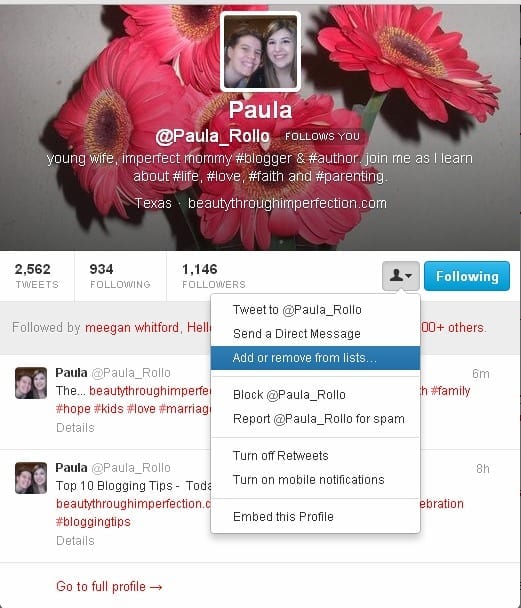
Lists let you separate groups of people into easy to find categories. Find the person you want to add to your list, click the little man icon and find ‘Add of remove from lists’. From there you can create a new list or add them to an existing list. Its a great way to able to find people in the shuffle of Twitter. [Ps.. thats my friend Paula’s twitter. She’s awesome, yall!]
5. BE USEFUL
People are looking for three things – something that saves them time, money or entertains them. People that tweet random things that do none of the above are likely to have people unfollow them. A great recipe idea saves people time, an easy at home craft saves people money and quotes entertain people. It doesn’t have to be anything fancy, just be useful to your audience.
6. ENGAGE
Thank people for following, respond to questions, retweet a great recipe idea. People follow you because they want to get to know you. Its common courtesy to follow people who follow you (minus spam and such) but go the extra step and interact with your new follower. Twitter is about making connections, so go ahead, engage with your tweeps!
7. BE YOURSELF
Above everything else, be yourself. Be the person you are in real life on Twitter. You’re awesome, just make sure Twitter knows it too!
Source:The Grant Life

Monday, November 16, 2015
11 THINGS YOU SHOULD STOP DOING ON SOCIAL MEDIA
After you’ve been blogging a while, you’ve surely come across things other people do on social that drive you nuts.
As someone who’s been in marketing communications for years and years, I have extra Spidey senses when it comes to the way people communicate (which makes me not only hyperaware but also HYPER-PICKY). Sometimes I’m in awe of the sheer brilliance of a blogger’s Instagram images or clever idea for a Facebook post. Other times, I just shake my head.

These annoyances pretty much take the cake. Of course, there’s no RIGHT way to use social. I get it. But still, these are some common ones that come up in any social media pet peeve convo.
1. Auto-posting Facebook Posts to Twitter
I see a lot of offenders to this, so maybe it doesn’t bother others as much as it bothers me. 
Auto-posting basically posts EVERYTHING you share on Facebook to Twitter. As a follower, you often have to go to Facebook to THEN go to the final destination (like a link to a post). If you’re sharing an image on Facebook without any accompanying text, as some bloggers often do when sharing a quote, it just tweets out like “fb.me/ccjiotw” which looks spammy. Or if you write something longer on Facebook, it gets cut off because you have more space on Facebook than Twitter.
Plus, people who are on Twitter are on Twitter. They don’t want to be on Facebook at the moment (or they avoid Facebook altogether). So they’d rather see the content ON Twitter versus being driven to Facebook.
What to do instead: First of all, disconnect that puppy! The quickest way is to head over to facebook.com/twitter and then click “Unlink.” Then use something like HootSuite or Buffer to post to both places at once… with a custom message for each (see #11 for more on that).
2. Overusing Hashtags
Too many hashtags just looks desperate. No matter what the platform. I spammy-looking Instagram post with 25 hashtags or the tweet that’s hard to read because there’s a #hashtag #on #almost every #word in the #sentence. My head hurts just reading that.
But well-balanced hashtag use isn’t a “one size fits all platforms” kind of thing. For example, I think you can get away with more on Instagram than you can Twitter. I wouldn’t scoff at 5 hashtags on Instagram, but when you only have 140 characters, it just seems like overkill.
And Pinterest? Don’t even use them. Like we tell Pinning Perfect students, they aren’t native to the platform (translation= they don’t work like on other platforms) and Pinterest says they’ll ding your pin if you use too many.
What to do instead: Keep your hashtag usage in check. Simple as that.
3. Posting Too Much Content at Once
I know you’ve been slammed by it… the person pinning 50 pictures of bedroom layout ideas or a play-by-play on Instagram that hogs your entire feed. (I’ll forgive you if you’re at an event or Twitter party – but still – no one needs 10 Instagrams from you within an hour.)
Posting too much content at once on a consistent basis can turn your audience off because they aren’t seeing as much content from a variety of people. So cut it out (said with cheesy Uncle Joey hand gestures).

What to do instead: If you have a lot of stuff to pin, consider if it makes more sense to put on a secret board instead of sending it through your feed. If you’re pinning stuff your followers would love, then try a scheduling tool like Tailwind Plus (affiliate). For other platforms, just be mindful on how many times you’re posting in a row.
4. Starting Tweets with @ When You’re Trying to Share with Your Followers
I see this mistake ALL the time. But if you didn’t know this? No worries. I see BIG brands to this too.
The scenario goes like this: you’re trying to tell your followers how awesome your trip to Disney World was so you tweet “@waltdisneyworld was such a blast, you guys!”
Guess what? That doesn’t go to all your followers.
Any tweet that starts with @ is considered a reply. Only people who follow BOTH youand @waltdisneyworld will actually see it. Since they follow you both, they can see replies since your Twitter feed is public.
What to do instead: Either re-word the sentence so it doesn’t start with @, or you go the lazy route and just add a period in front of the @. I’m lazy and always add the period!
5. Asking People to Follow You Back (on ANY Platform)
If there’s one that thing that’s sure to get me NOT to follow you, it’s for you to follow me then immediately say “Just followed/liked you! You can follow me too!” Or on Facebook, this happens too: “New like from blahblahblah. Hope you’ll like me back!” It’s pretty much the equivalent of comment vomit.
I chalk this one up to a newbie mistake (for the most part). Until you get entrenched in the blogging world a little more, it’s hard to wrap your head around exactly HOW to get new followers. So this tactic sounds innocent enough. But, wanna know the truth? You have to EARN followers and likes.
What to do instead: If you want people to like or follow you back, interact with them. Respond when they ask a question or leave a comment on a post. And of course, it’s pretty likely someone will follow you when you follow them. But just don’t ask for it.
6. Posting Too Many Quotes
I get it. Quotes WORK. Good quotes inspire, motivate, and even just cause a good laugh. But just because quotes work doesn’t mean 90% of your social media stream should be quotes. If someone’s trying to decide to follow/friend/like you, they don’t want to see back-to-back-to-back-to-back-to-back tweets of quotes.
What to do instead: Use them! Just don’t let them overtake your social universe. You CAN have too much of a good thing.
7. Using Fake Names on LinkedIn
LinkedIn is a place to put your work experience, highlight your awesomeness, and be visible to brands looking for bloggers. On Twitter you can get away with a cute or clever Twitter handle, but on LinkedIn? You’re a real person with a real photo. And you’re a real professional too! If your LinkedIn name sounds something like “Melissa Carolinamommy” then you. must. change. that.
What to do instead: Use an actual name, or stay away from LinkedIn until you’re ready to be a real person.
8. Keeping Your Social Media Accounts Private
Okay, if you’re a blogger just on social to chat with friends and post pictures to friends, then by all means keep your profiles private!
Buuuut, if you’re a blogger looking to grow your blog traffic, then you have to make your accounts public. I’m not talking about your personal Facebook profile- I keep that one tight to my vest. But platforms like Twitter? Make it as easy as possible to follow you- a private account is an extra hassle most people won’t bother with because they can’t see your content before they decide to follow.
What to do instead: If you want to keep some accounts private, then do NOT link to them from your blog. Otherwise, make those profiles public and you’ll instantly notice you grow your following faster.
9. Pitching Brands Publicly
Want a sure fire way to look unprofessional? Leave a comment on a company’s Instagram post that sounds like this: “How can I get free products to review? I’m a popular blogger!” Or tweet something like “Hey @brand @brand @brand- need someone to review your products? I need blogging material.” (Not the exact messages I’ve seen but very close.)
Social media is a great place to start in getting a good contact, but not like that. Plus, while you should keep pitches brief, you can’t say all that much in 140 characters.
What to do instead: Ask the brand who you should reach out to about opportunities for bloggers. That way you’re taking the actual pitch out of the public space. Or post a private message on a brand’s Facebook page.
10. Relying on Collaborative Boards on Pinterest
I know. I know. Collaborative boards used to be the secret sauce to successful pinning. But with the Smart Feed? Not so much. You’ve probably noticed you aren’t getting as many re-pins from collaborative boards. That’s a deliberate move by Pinterest, not anything you did wrong!
What to do instead: Remember that search is king on Pinterest now, not collaborative boards. Use keywords in your pin descriptions, but still make it sound conversational. In Pinning Perfect, one thing we teach is to severely limit the number of collaborative boards you’re on and show you how to write effective descriptions.
11. Posting the Exact Same Message Everywhere
When you send out a message on social, do you copy and paste it into every social platform? Different platforms call for different approaches. On Twitter, keep it short. On Google +, you can go longer, making your post keyword-rich. On Instagram, maybe you share a behind-the-scenes image from the craft you just posted or the recipe you just created.
What to do instead: No, you don’t need to completely rewrite every single thing. And sometimes it’s short and sweet enough for more than one platform. But for the majority of your content, adjust and tweak it a little to cater to each audience and platform.
Source: Blog Clarity
Thursday, November 5, 2015
18 simple tips to get more retweets

1.Share unique and original content
Everybody loves to retweets the new stuff
2.Break news
People retweet breaking news stories more than anything else on Twitter.
3.If you can't be the first,be the first to make it interesting
Put your unique spin on the story
4.Give the people what they want
Figure out exactly what it is that you twitter followers expect to see from you.
Give them that.
5.Always upload a picture
Tweets with image generate at least twice the engagment of text-only tweets
but only when you upload directly to twitter
6.don't talk about yourself all of the time
Seriously,nobody cares about you but they care about themselves
so tweet about them
7.Leave plenty of space
Not everybody uses the twitter retweet buttons.
Mony folks still like to add their own comments to retweets,sharing via the old-school RT @ or "quote tweet" method
Tip:start thinking of tweets as 100 characters or less.
This leaves plenty of room for a link or an image and some extra room for old-fashioned retweeting.
8:Retweet others
Really,it has to work both ways
9.Have a short and sensible username
Twitter allows a maximum of 15 characters for usernames but the longer yours is, the more awkward it is for people to retweet your messages.
10.Use hashtags
But don't use more than 1-2 at a time
otherwise it has a negative impact on retweets
11.Use an exclamation point
Studies have shown that tweets that contain an exclamation point generate twice as many retweets as those without
12.Including a link
Place it in the middle or the end of tweet
13.Ask
Simply asking for retweets can generate 3-4 times the amount of engagment
But you must use the word "retweet" in full and not "RT" or "R/T"
14.Figure out when everybody is around
Not much point tweeting to yourself
15.pay attention to spelling,grammar and overall readability
Typos,WRITING IN ALL CAPS or twtng n txt spk
can dramatically reduce your retweet chances
16.Tweet a lot
Seriously, one tweet a day isn’t going to cut it.
The more you tweet, the greater the chance your content will be seen and retweeted.
Aim for at least 5 tweets per day.
Every day
17. Keep to a schedule
Spread your tweets out over the entire day, and use Buffer or Hootsuite to plan your tweet calendar well in advance.
18. Stay on target
Consistency goes a long way on Twitter.
If people know what you’re about they’ll look out for your content and proactively retweet your best stuff.
If you aren’t getting the results that you expect…
… change the formula!
Subscribe to:
Posts (Atom)